

Copyright © 2019 - 2026 AR Webcrafts LLC. | All Rights Reserved
- Welcome, We Transform Your Concepts into Reality.
A custom WooCommerce add-on that sets minimum and maximum quantity and value limits per product, per category, and per order — with user role exclusions — built by AR Webcrafts.
A wholesale and B2B WooCommerce store came to us with a persistent problem: retail customers were placing tiny orders that weren’t worth fulfilling — buying one unit of a product that had a minimum viable order of 12. At the same time, bulk buyers were occasionally over-ordering limited stock items, leaving other customers with nothing. The store needed a smart, rule-based quantity control system that enforced the right limits on the right customers — automatically, at checkout.
Retail customers were placing orders below the store’s minimum viable fulfillment quantity — costing more to process than they earned
Bulk buyers were over-ordering high-demand items, creating stock shortages for other customers
No native WooCommerce feature allows per-product, per-category, or per-order quantity limits with validation at checkout
Wholesale customers needed different rules than retail customers — but the store had no role-based quantity control
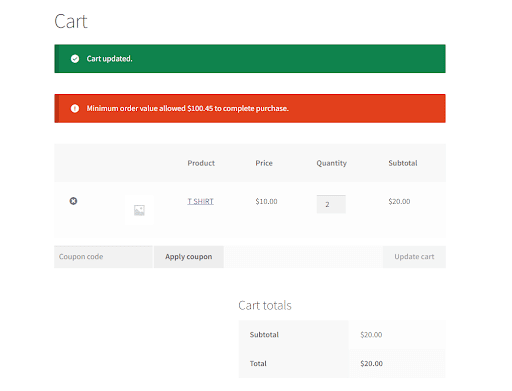
No custom error messaging existed — customers who hit a limit got a generic error with no explanation of what the requirement actually was
Some products needed to be purchased in specific multiples (e.g., boxes of 6 or 12) — WooCommerce had no quantity grouping enforcement
"We were losing money on small orders — the shipping alone cost more than the margin. After setting a minimum order value, those orders stopped completely and our average order value jumped by over 40%. The wholesale exclusion meant our B2B clients weren't affected at all. Exactly what we needed."
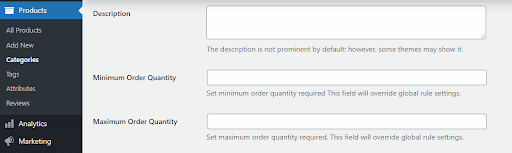
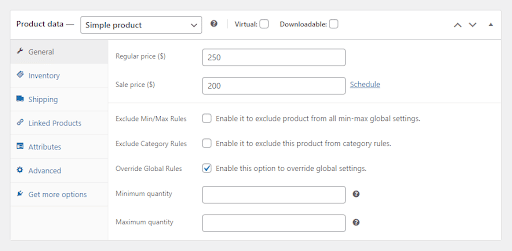
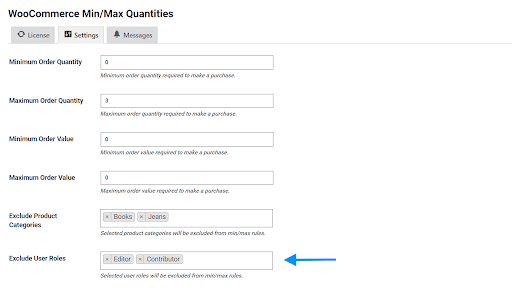
AR Webcrafts built a comprehensive quantity rules engine for WooCommerce that gives store admins full control over purchase limits at every level. Admins set minimum and maximum purchase quantities per individual product, per product category, or globally across the entire store. They also set minimum and maximum order values — so customers can’t check out with a cart below a certain dollar amount. For products sold in bulk packaging, a quantity grouping rule forces purchases in specific multiples (e.g., must buy in groups of 6). All rules validate at checkout with fully customizable error messages that clearly explain the requirement to the customer. Wholesale customers and VIP buyers can be excluded from restrictions by user role — so the same store can serve both retail and wholesale customers without separate setups. Every rule applies cleanly to both simple and variable products, including individual variation-level controls.
The store virtually eliminated unprofitable micro-orders within the first month of launch. Minimum order value enforcement ensured every fulfilled order met the profitability threshold. Wholesale customers continued ordering freely thanks to role-based exclusions — they saw no change in their experience. Stock management improved because high-demand items were protected by maximum quantity limits, ensuring fair access across all customers. The custom error messages reduced customer support queries because buyers understood exactly what was required before they could check out.



We build custom quantity and order management tools for WooCommerce that protect your margins, manage your stock, and give every customer the right buying experience.