
If you run online courses in the United States, you probably know LearnDash stands out as a popular WordPress LMS plugin. Many course creators choose it because LearnDash is a popular WordPress tool that turns a regular WordPress site into a powerful learning management system. Basically LearnDash makes it easy to create and sell courses with features like a drag and drop course builder, advanced quiz options and ways to award badge or certificates on course completion.
Yet here’s what we see all the time at arwebcrafts: most people start with the standard LearnDash LMS plugin and add lots of extra plugins to get everything working. That approach works at first, but soon the site feels slow, updates become tricky and tracking learner progress gets messy. LearnDash provides strong core LMS features, but out of the box setups often need more customization to feel seamless and match exactly what course creators want for their students.
We focus on building custom LearnDash solutions for clients across the United States. Instead of relying on piles of third party lms plugins, we write clean code that replaces bloated add ons. This keeps your WordPress LMS fast, secure and easy to manage long term. Whether you already use LearnDash or plan to start courses using WordPress, our team handles everything from initial setup to ongoing updates and support.
Many major universities and Fortune 500 companies trust LearnDash for good reason it offers a powerful LMS with tools like course content drip, advanced features for quizzes and seamless integration options. But when sites grow, standard setups hit limits. That’s where custom development shines. At arwebcrafts, we help you build a hosted course website that scales without extra costs from multiple pricing plans or add ons.
In the sections ahead, we’ll cover how LearnDash works, common challenges with typical installs and how our custom approach fixes those issues. You’ll see real ways we improve the learning experience and user experience for both instructors and students.
What Is LearnDash and How Does It Work as a WordPress LMS?
LearnDash serves as one of the most trusted WordPress LMS options available today. LearnDash offers everything needed to start online learning platforms right inside your WordPress dashboard.
LearnDash LMS Overview
At its core, LearnDash acts as a lms plugin for WordPress that adds full e learning capabilities. You install the LearnDash LMS plugin and suddenly you gain tools to build LearnDash courses, organize lessons and manage students. LearnDash integrates seamlessly with popular tools like WooCommerce for payments via Stripe or PayPal and it works well with page builder plugins such as Elementor. Many see LearnDash as a popular WordPress LMS because it powers sites for everyone from individual course creators to large organizations. The ability to create structured online courses using simple menus makes building your course straightforward.
LearnDash Plugin WordPress Basics
Getting started with the WordPress LMS plugin feels simple. After activation, you access a new menu for courses, lessons, topics and quizzes. The drag and drop course builder lets you arrange course content without touching a line of code. LearnDash’s focus mode provides a clean learning experience for students and the dashboard shows progress at a glance. You can set prerequisites, drip content, or offer one time access purchases. Video tutorial options and step by step builders help new users feel comfortable quickly.
LMS Features for Course Creators
LearnDash packs strong lms features that help create your courses effectively. The advanced quiz builder supports multiple question types, timers and randomisation. You can award points, badge, or certificates to boost engagement. Learner enrollment happens manually or automatically through sales. LearnDash provides detailed reports on course completion and time spent. It supports group management, assignments and essay grading. For monetization, connect to WooCommerce or other tools to sell courses. The template system and focus mode improve the overall experience for users.
| Feature | Built in in LearnDash | Often Requires Add on | Custom Solution Benefit |
|---|---|---|---|
| Drag and Drop Builder | Yes | No | Faster setup with exact layout needs |
| Advanced Quizzes | Yes | Sometimes | Tailored question types without bloat |
| Certificates & Badges | Yes | No | Fully branded designs |
| Drip Content | Yes | No | Precise scheduling per user |
| Basic Reporting | Yes | For advanced | Deep insights without extra licenses |
| Payment Integration | Via WooCommerce | Yes | Direct, secure options |
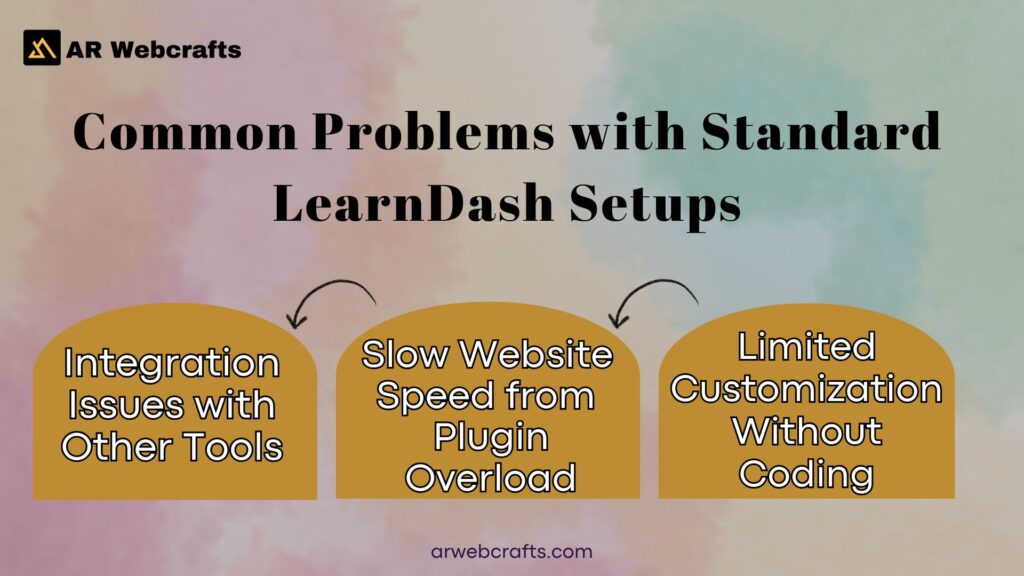
Common Problems with Standard LearnDash Setups
Many course creators love starting with LearnDash, but standard setups often run into issues as sites grow.
Slow Website Speed from Plugin Overload
Adding multiple plugins to extend LearnDash creates heavy loads. Each extra lms plugin adds scripts and database queries that slow page loads. Students notice delays when accessing course content or taking quizzes and that hurts the learning experience. Slow sites also affect search rankings for online courses using the platform.
Limited Customization Without Coding
The core LearnDash tools work well, but changing layouts or adding unique flows usually needs custom code or more add ons. For example, altering the learner dashboard or creating special course completion rules feels restricted. Many rely on template overrides that break during product updates.
Integration Issues with Other Tools
Connecting LearnDash to tools like MemberPress, BuddyPress, or external APIs can cause conflicts. Payments through WooCommerce work, but advanced memberships or automations often need workarounds. These gaps make managing successful online courses harder.
Tracking Learner Progress and Reporting Gaps
Basic reports show progress, but detailed views on individual student progress or time spent require add ons like LearnDash ProPanel. Even then, large sites face slow loading or missing filters for specific learning outcomes.
LearnDash ProPanel Limitations for Large Sites
LearnDash ProPanel adds useful filters and widgets for activity, quizzes and essays. However, on sites with thousands of users, reports load slowly despite caching. It lacks fully custom dashboards or real time exports without extra setup.
LearnDash Alternatives Why Many Switch or Need Custom Help
Some course creators look at other options when LearnDash feels too tied to WordPress management.
Popular LearnDash Alternatives in 2025
Options like Tutor LMS, LearnPress, LifterLMS, Masteriyo and hosted platforms such as Thinkific or Kajabi gain traction. Tutor LMS appeals for its modern interface and gamification. LearnPress stays free with solid basics. Hosted tools remove WordPress hosting needs but limit control.
When Standard LearnDash Falls Short
Standard LearnDash shines for WordPress users who want ownership. But without custom work, it struggles with heavy customization without code, complex reporting, or very large scale elearning. That’s when many seek help or consider switches.
Our Custom LearnDash Solutions at AR Web Crafts
At arwebcrafts, we specialize in custom LearnDash projects that go beyond the standard LearnDash LMS plugin.
Full LearnDash LMS Setup and Configuration
We handle complete installs on your WordPress site, including best practices for the course builder and initial structures. We configure payments, enrollment rules and focus mode for the best experience for your users.
Custom Plugin Development for Missing Features
We build lightweight plugins that add exactly what you need, like special advanced quiz types or unique badge systems. This avoids extra licenses and keeps everything clean.
Third Party Integrations and API Connections
We connect LearnDash smoothly to tools such as WooCommerce, Stripe, MemberDash, or custom systems. No more conflicts just reliable data flow.
Speed Optimization and Performance Tuning
We optimize databases, images and code so your site loads quickly even with many learners. This includes caching and server recommendations tailored for online courses.
LearnDash Migration from Other Platforms
Moving from platforms like Thinkific or other lms plugins? We transfer courses, user data and progress safely.
| Service | What It Includes | Benefit for Your Site |
|---|---|---|
| Full Setup | Plugin install, basic config, payments | Quick launch with solid foundation |
| Custom Plugins | Bespoke features coded cleanly | Exact tools without bloat |
| Integrations | API connections, third party tools | Smooth data flow across systems |
| Speed Tuning | Database cleanup, caching | Fast loads for better engagement |
| Migration | Content & user transfer | Seamless switch without data loss |
Advanced LearnDash Features We Build for Clients
We create extras that make LearnDash feel truly tailored.
Custom Learner Dashboard and Student Progress Tracking
We design dashboards that show clear student progress, time spent and next steps. Students see personalized views that improve engagement and learning outcomes.
BuddyBoss LearnDash Integration and Social Learning
We set up BuddyBoss LearnDash connections for social groups tied to courses. Learners discuss lessons, share insights and build community around course content.
LearnDash AI Powered Personalization Options
Using LearnDash AI tools for outlines and quizzes, we add personalization like adaptive paths or virtual instructor support where it fits.
Enhanced Reporting Beyond ProPanel
We build custom reports that load fast and filter exactly how you need, covering deep learndash review student progress metrics and trends.
Benefits of Professional Custom LearnDash Development
When you choose professional custom LearnDash development, the improvements show up quickly in how your online courses perform. A tailored WordPress LMS runs smoother, keeps learners engaged longer and saves you money over time. Many course creators in the United States notice these changes right after launch.
Faster Course Website with Better User Experience
Custom work removes unnecessary plugins and streamlines code, so pages load quickly even on mobile devices. Students enjoy a clean learner dashboard with clear student progress views and easy access to course content. The learning experience feels responsive and the overall user experience encourages people to finish LearnDash courses. Fast sites also help with search rankings for online learning platforms. When learners move through lessons without delays, they stay motivated and give better feedback on the experience for users.
Lower Long Term Costs and Fewer Plugin Licenses
Standard setups often require multiple paid add ons for advanced features like extra reporting or special integrations. Custom development builds those tools directly into your site, so you avoid yearly plugin fees. You pay once for clean code instead of ongoing licenses. This approach keeps your WordPress site lean and reduces future expenses on updates and support. Many clients see savings within the first year.
Scalable LMS That Grows with Your Courses
A custom LearnDash LMS handles growth without slowing down. Add new courses using WordPress, enroll thousands of learners, or expand course creation features the system adapts easily. Built in scalability means no major rebuilds later. Your powerful learning management system supports larger audiences and more complex e learning setups as your business expands.
Direct Access to Experienced Developers
You work straight with the team building your site. Questions about LearnDash support or changes get quick answers from people who know your project inside out. This direct line speeds up fixes and new ideas.
Real Client Results with Custom LearnDash Projects
We love sharing stories from actual projects because they show how custom LearnDash work makes a real difference for course creators across the United States.
Case Study: Online Course Platform for Professional Training
One client ran certification programs for industry professionals. Their old setup used many lms plugins and loaded slowly, causing high dropout rates. We rebuilt the site with custom code for the drag and drop course builder, advanced quiz features and streamlined WooCommerce payments. We added tailored badge and certificate designs plus deep learndash review student progress reports. After launch, page speeds improved by over 60%, completion rates rose 35% and they enrolled more students without adding extra plugin costs. The clean dashboard and seamless flow kept learners coming back for advanced online courses.
Case Study: Membership Site with Advanced Tracking
A membership business wanted detailed insights into member activity across multiple LearnDash courses. Standard ProPanel reports felt limited for their needs. We created custom tracking for time spent, learning outcomes and personalized paths. We connected everything to MemberPress and Stripe for smooth recurring payments. The new system provided real time data on course completion and engagement. Revenue grew steadily because members stayed longer and upgraded plans based on clear progress views.
What Clients Say About Our LearnDash Support
Hearing directly from clients means a lot to us. Here are a few recent comments from people we’ve worked with on LearnDash projects.
Client Review 1 – Education Platform Owner
“Working with the team at arwebcrafts changed everything for my online course platform. They fixed speed issues and built exactly the student progress tools I needed. The technical support stays responsive and my site finally feels professional.” Sarah T., Education Platform Owner
Client Review 2 – Corporate Training Company
“The custom integrations saved us hours every week. Our LearnDash LMS now tracks employee progress perfectly and the support team answers questions fast. Best decision we made for our training programs.” Mike R., Corporate Training Director
Client Review 3 – Course Creator in the United States
“I was worried about managing LearnDash updates myself. arwebcrafts handled everything smoothly and added features I didn’t think possible. My students love the clean learning experience and sales keep growing.” Jennifer L., Independent Course Creator
Why Choose AR Web Crafts for Your LearnDash Project
At arwebcrafts, we focus entirely on WordPress and LearnDash projects for clients in the United States. Our approach comes from years of solving real problems for course creators.
Years of WordPress and LearnDash Experience
Our team has built dozens of LearnDash sites from simple online courses to complex elearning platforms. We stay current with product updates, seamless integration methods and best practices for powerful LMS setups.
Direct Developer Access and Clear Communication
You talk directly to the developers working on your site no middle layers or ticket queues. We explain options in plain terms and share progress regularly so you always know what’s happening.
Ongoing Technical Support and Maintenance Options
After launch, we offer flexible plans for updates and support, security checks and small tweaks. Your WordPress LMS stays secure and running smoothly without you handling every detail.
Focus on Performance and Clean Code
Every line we write prioritizes speed and reliability. Clean code means fewer bugs, faster loads and easier future changes.
| Aspect | DIY Approach | AR Web Crafts Custom Development |
|---|---|---|
| Speed & Performance | Often slow from many plugins | Fast, optimized code |
| Customization | Limited without coding knowledge | Exact features built for your needs |
| Long Term Costs | Multiple yearly plugin fees | One time build, lower ongoing expenses |
| Support | Community forums, slow responses | Direct developer help |
| Scalability | Hits limits as users grow | Built to handle expansion |
| Updates & Security | Manual, risk of breaking site | Managed safely |
Get Started with Your Custom LearnDash LMS Today
We help course creators across the United States create custom WordPress LMS platforms at 1443 E 2nd St, Casper, WY 82601.
Contact us today at +1 307 278 4862 or share your current setup or plans and we’ll show how our custom solutions can get you results in just weeks.
FAQ’s
1. What is LearnDash?
LearnDash is a popular WordPress plugin that turns your site into a full learning management system. From my years building sites for course creators, LearnDash stands out as a solid choice for anyone wanting control over their online courses.
What is LearnDash used for?
LearnDash helps create and sell online courses directly on WordPress sites. I’ve used it on client projects to build everything from professional training programs to membership based learning platforms with strong powerful features.
Is LearnDash free?
No, LearnDash is a premium plugin with no free version available. There are free alternatives, but LearnDash offers paid plans that include regular updates and customer support.
How much does LearnDash cost?
Pricing starts around $199 per year for a single site license. Higher plans go up for multiple sites and add ons can add to the cost depending on needs.
What is the best LMS platform for WordPress?
Many consider LearnDash the best because of its flexibility and depth. In my experience working with various options, it fits most serious course creators who want ownership and custom options.
Is LearnDash compatible with Elementor?
Yes, LearnDash works well with Elementor. I’ve built many sites combining both for beautiful course pages without conflicts.
How to install LearnDash?
Purchase the plugin, download the zip file, then upload it through your WordPress dashboard under Plugins > Add New. Activate it, enter your license key and follow the setup wizard.
How to customize LearnDash?
You can customize LearnDash through settings, shortcodes, or custom code. For deeper changes like learndash review student progress tools, we often add bespoke solutions that designed to enhance the experience.
What are the features and benefits of LearnDash?
LearnDash includes drip content, quizzes, certificates and payment integrations. Benefits include full ownership, responsive support and tools that drive customer success for course businesses.
What are some of the challenges of using LearnDash?
Standard setups can slow down with too many add ons or need custom work for advanced tracking. Options like WP Engine managed hosting or integrations with ThriveCart help and step by step tutorials from the team make fixes easier.
